Most digital signage buyers assume the player is a solved problem. Pick a BrightSign, slot in an OPS module, or stick an Android box behind the screen, and the content loop plays. For years that was true. Now the screen is expected to do more: recognize a face in the queue, swap the panel to the right language, answer a kiosk question in natural prose, or flag empty shelves back to a store manager. That workload does not fit the chip inside a $300 media player.
This piece walks through the small form-factor hardware classes actually used for signage today, what each one can and cannot do, and where a GPU-equipped edge box earns its slot. If you are sizing an estate that will carry on-prem LLM inference next year, the choices you make at the player level set the ceiling for everything above it.
What SFF Means in Signage
"Small form-factor" in digital signage is not a single thing. It covers at least five enclosure classes, each with its own supplier base and I/O conventions:
- Purpose-built media players. Palm-sized, fanless, running a proprietary OS. BrightSign is the archetype. BrightSign reached two million units shipped four years after passing one million in Q3 2017, which gives a sense of the installed base you are deploying alongside.
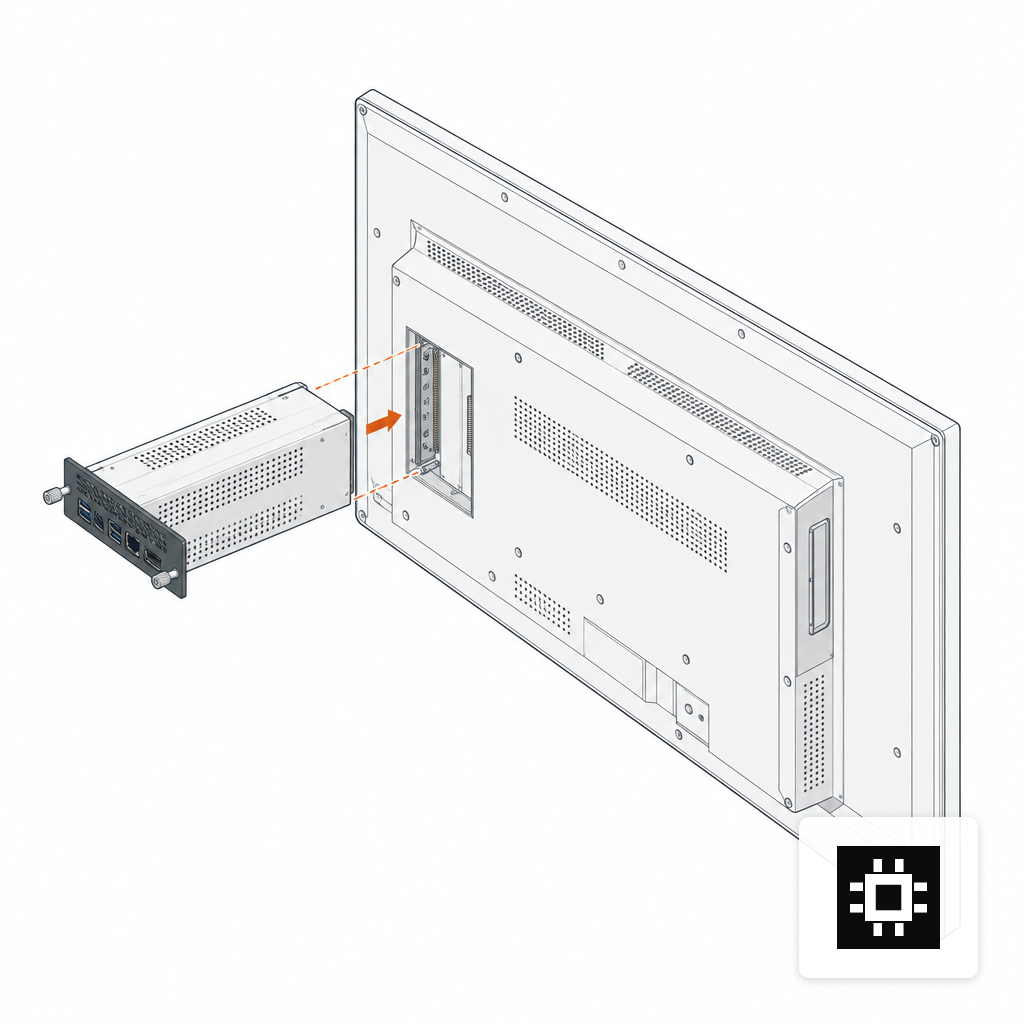
- OPS modules. A pluggable computer sliding into an 80-pin slot on the back of a commercial display. Intel's OPS specification defines the mechanical, electrical and thermal interface, carrying DisplayPort, USB 2.0/3.0, audio, UART and control signals through a single JAE TX25 connector.
- Industrial mini-PCs. Fanless x86 boxes from Advantech, AOPEN, NEXCOM, IBASE and similar suppliers, VESA-mountable behind the display.
- Single-board computers. Raspberry Pi 5 and its ecosystem, including the Smart Display Module for integrators building custom panels.
- Edge AI compute. NVIDIA Jetson modules, Hailo-equipped boxes, and compact GPU workstations that happen to live near a screen.
Each class trades off horsepower, cost, serviceability and the kind of software stack you can realistically run on it. The decision tree gets harder when the screen is also expected to do inference locally.
Where OPS Still Wins
OPS was designed to collapse the "many moving parts" problem. A traditional install has a PC-based media player, a power supply, a video cable, control cables and the display, and each component is a point of failure that can be knocked loose by a cleaner's trolley or killed by airborne dust. OPS puts the compute inside the display, so the only external cable is power.
For meeting rooms, interactive flat panels, classrooms and lobby screens where a Windows experience is non-negotiable, OPS is still the right answer. The industrial side of the ecosystem is well populated: Axiomtek's Intel Smart Display Modules and comparable Advantech, IBASE and NEXCOM units cover the Intel Core i3 through i7 range in the standard 180 by 119 by 30 mm envelope.
Where OPS stops being the right answer is when you want a discrete GPU. The slot's thermal and power envelope was not drawn for a 150 W accelerator. If you need to run a 7B or 14B parameter model behind the display for interactive kiosks, an OPS module will not get you there on its own.
The Dedicated Player Ecosystem
BrightSign, Advantech, AOPEN, IAdea, NEXCOM, Stratacache and ONELAN form the core of the dedicated player market. Within a single vendor's line, the capability ladder is steep. BrightSign's current range spans entry 1080p units up to the XT1145 for multi-zone 4K video walls, with the XC5 line adding on-device computer-vision inference.
These players are reliable, draw single-digit watts and are managed through familiar signage CMSes. What they are not is a general-purpose inference target. You will not run a quantized Llama 3.1 8B on a BrightSign. You will not fine-tune anything. You will not host a vector database next to the content loop. The appliance model that makes them easy to deploy also caps what you can bolt on later.
If your roadmap is static playlists and the occasional interactive overlay, that cap is fine. If the roadmap includes a chatbot kiosk, local vision analytics, or any form of personalization driven by an LLM, the player stops being the right place for the workload and the question becomes where to put the AI compute.
When Signage Becomes an AI Workload
There are three signage patterns that pull inference onto the edge rather than back to a data center or a cloud endpoint:
- Vision analytics. Dwell time, queue length, demographic estimation, shelf monitoring. These are small models by LLM standards but they run continuously and benefit from a local accelerator.
- Interactive kiosks. Natural-language wayfinding, product Q&A, multilingual support. A 7B to 14B open-weight model is the typical starting point and needs a GPU with enough VRAM to hold the weights and a working context.
- Personalization. Dynamic creative based on local signals, with the panel being swapped by a model running on-site rather than scheduled centrally.
Latency, bandwidth and data residency usually decide whether this stays on-prem. A quick-service drive-through swapping menu items based on time of day cannot wait on a round trip to a regional cloud. A hospital kiosk handling patient-facing questions should not be sending transcripts out of the building. These are the same drivers that push LLMs on-prem in general, and the sizing logic is the same: for a sense of what fits in what, the AI hardware estimator covers the VRAM math for typical open-weight models.
The Edge AI Hardware Layer
Once inference enters the picture, the SFF options narrow to three practical paths.
Jetson-class modules are the signage-adjacent default for vision workloads. The Jetson Orin Nano 8GB delivers up to 67 TOPS in Super Mode on a 1024-core Ampere GPU with 32 Tensor Cores, 8GB of LPDDR5 at 102 GB/s and a 6-core Cortex-A78AE CPU. That is enough for continuous object detection, OCR, and small language models in the 1B to 3B range at tolerable throughput. It is not enough for a 7B model with a usable context window.
Compact x86 boxes with a discrete GPU cover the middle. A single RTX-class card inside a fanned SFF chassis gives you 16 to 24 GB of VRAM, which comfortably hosts a quantized 7B or 13B model and still fits in a service closet. These are the units that get mounted on a backroom wall and feed every screen in a store from one point.
Ruggedized edge compute extends the same idea into warehouses, outdoor kiosks and remote sites. The chassis is sealed, often fanless above a certain temperature band, and tolerant of vibration and dust. The cstmAI Edge sits in this class, and the trade-offs that come with offline operation apply here the same way they do anywhere else, as covered in the piece on air-gapped AI servers.
Sizing the Player Against the Display
Thermal and electrical headroom are easy to get wrong. A commercial display is already a non-trivial load: a 32-inch commercial panel draws roughly 50 to 70 W under standard operation, and a 55-inch panel pulls 120 to 180 W depending on panel technology and brightness. Add a GPU-equipped player on the same circuit and you need to actually check the breaker budget before you mount anything.
Enclosure matters as much. SFF chassis behind a display sit in a sealed VESA cavity with little airflow and often adjacent to the backlight heat. Fanless designs are the usual answer, but a Jetson or GPU box pushing continuous inference will throttle inside a sealed enclosure built for a BrightSign. If you are putting AI compute behind the panel, specify the cavity, the ambient and the duty cycle up front. Power, cooling and acoustic trade-offs for the larger end of the family are covered in this piece on power, cooling and noise.
For single-board use cases, the Raspberry Pi 5 is now a credible 4K signage endpoint on a 5V/5A USB-C PD supply, with dual 4Kp60 HDMI outputs driven by the VideoCore VII GPU. It does not run meaningful LLM inference, but as a thin client talking back to an edge box in the same building, it has a place.
Choosing a Supplier Shortlist
The vendor map falls into three buckets you should treat separately:
- Signage-native players. BrightSign, IAdea, Stratacache, ONELAN, Mvix. Buy here when the workload is content playback and the AI, if any, is a narrow on-device feature.
- Industrial SFF. Advantech, AOPEN, NEXCOM, IBASE, Axiomtek. Buy here when you need x86, OPS compliance or a specific I/O profile and you plan to run a Windows or Linux signage stack yourself.
- Edge AI integrators. Builders who assemble GPU-equipped SFF or ruggedized boxes against a specification. Buy here when the panel is the thin end of an on-prem LLM deployment and you need the software stack, model choice and governance to match. hardware.co's vendor-neutral systems are built for this third case.
The common mistake is to buy from the first bucket and then discover eighteen months later that the roadmap has moved into the third. Switching players is cheap. Switching the whole fleet because the player cannot host the model you now want is not.
Where This Leaves a Signage Buyer
If the question is "what plays the loop," the dedicated player market is mature and the choice is largely about CMS alignment. If the question is "what also runs the model that personalizes the loop, answers the kiosk, or reads the camera feed," you are no longer buying signage hardware. You are buying edge AI hardware that happens to be behind a screen. The suppliers, the thermal budgets and the software stack all shift. The screens stay the same.
Picking the right class before the pilot avoids the expensive version of this discovery, which usually arrives after the first store rollout. Match the player to the workload you actually intend to run in year two, not the one you are running in month one.