

A used H100 that logs uncorrectable ECC errors is not automatically scrap. Hopper and Ampere offer up to 512 row remap slots per GPU, so what counts at inspection is how many slots are already spent and what else the event log says around them.
Secondhand A100s, H100s and L40S cards reaching resale channels in late 2026 come with a service history nobody recorded. The buyer who writes acceptance criteria into the purchase order and runs structured burn-in gets a different asset from the one who signs off on a quick nvidia-smi check at the receiving dock.
ECC Counters Separate Survivable From Terminal
Start with the counter nobody reads until the first job fails. The A100 and H100 memory controller treats uncorrectable ECC faults by retiring the affected row and remapping it, with a budget of 512 row remappings per GPU. Prior-generation cards had sixty-four page retirements and no remapping at all, which is why a single bad word on a V100 effectively bricked the card and why the same fault on Hopper is survivable.
Pull the remap counters from nvidia-smi query output and compare them against the correctable error rate over the past week. A card with twenty remapped rows and no new events under sustained load is usually fine. A card with two remaps and a correctable error rate climbing into the tens per hour is a different story: the HBM stack is degrading and the remap budget will not keep pace.
Run NVIDIA's DCGM Diagnostics at Level 3 on first power-on and Level 4 before acceptance. Level 4 includes Memtest and takes most of a workday on an eight-GPU host, but it is the only level that pushes the memory system hard enough to expose latent faults. Save the output: you want a clean baseline to compare against after thirty days of production. Whether an H100 or A100 class card is the right pick for the workload is a separate question from whether this specific unit survives inspection, and the H100, H200 and B200 inference comparison covers the SKU math.
Thermal History Shows on the Card and in the Logs
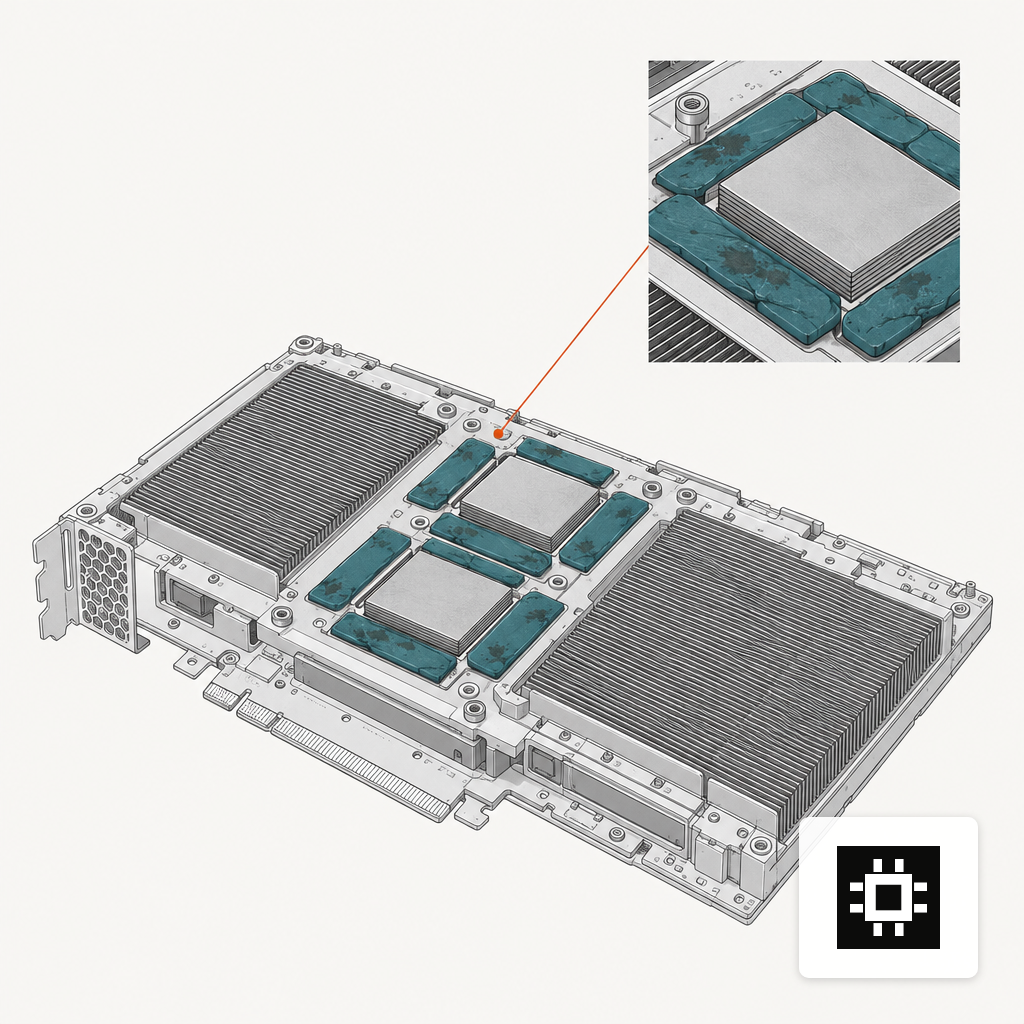
Open the shroud before anything else. Thermal pads on datacenter GPUs degrade with heat cycles and lose compliance once past their service window, which pad replacement guides put between three and five years for high-TDP cards. A pad that has released its oils onto the heatsink, or one that has visibly pancaked, means the card has been running near its thermal limit for an extended period. Expect hotspot deltas worse than datasheet.
Pull the GPU log history before sending any workload at it. nvidia-smi exposes a thermal event history: look for sustained throttling events, HW_SLOWDOWN assertions, and temperatures that touched 90 C under compute load. One excursion during a firmware flash does not matter. A pattern of weekly slowdowns across months does.
The A100 SXM4 default is a 400 W envelope, HGX variants with custom thermal solutions reach 500 W, and H100 SXM5 sits at 700 W. A used card inherits the thermal load the new deployment will throw at it, so verify the chassis can still dissipate that envelope at the inlet temperature the room actually runs. Reviewing power, cooling and noise at the rack level is often what rules out a secondhand purchase for a crowded colo before the cards themselves fail inspection.
Some XID Codes End the Inspection on Arrival
A handful of fault codes in the kernel log are deal-breakers at receiving, regardless of what the seller says or what DCGM reports. Double-bit uncorrectable ECC that could not be remapped, a GPU that has fallen off the PCIe bus in the past thirty days, and any uncontained ECC event are the three that matter most. All three indicate silicon faults that cannot be driver-remediated and that will usually recur in production.
Grep dmesg and the full syslog archive for NVRM: Xid entries before signing anything. Ask the seller for the raw logs rather than a redacted summary. If the logs have been rotated past the point where anything useful survives, that is also an answer: you are buying blind, which should flow through to price and to a longer burn-in window.
The donut below sorts the twenty-four XID codes most relevant to datacenter GPUs by the action they typically trigger. Transient and reset-only codes are common and survivable, which is the point of the chart: the cards that look alarming at a glance are often fine, and the quiet ones are where the hazards live.
Service Life Is the Hardest Thing to Verify
Service history is both the hardest input to confirm and the one that most changes the economics. A widely cited estimate from an Alphabet GenAI architect puts the service life of a datacenter GPU at one to two years at 60 to 70 percent sustained use, with three years as an upper bound. Resale inventory landing in late 2026 is mostly first-gen Hopper that shipped between Q3 2022 and mid-2024, and late-cycle Ampere from 2021 and 2022.
Pull the manufacture date from the GPU VBIOS or the module sticker and reconcile it with whatever duty cycle the seller claims. A card dated Q4 2022 that the previous owner ran as cloud inference capacity has been under near-constant load for most of its life. A card dated Q2 2024 that spent its time in a training cluster with maintenance windows is a very different asset at the same nominal age.
Price helps triangulate. Used Hopper traded at a steep discount to new within the first twenty-four months and at a steeper one past that, which is useful when the seller cannot or will not disclose provenance. The sankey below shows how 2025 secondary-market pricing spread across the SKUs most likely to arrive on a buyer's dock this cycle.
Acceptance Criteria Belong in the Purchase Order
Triage at receiving is cheap; a dispute after the wire is not. The PO is where acceptance becomes contractual. Four clauses do most of the work on used GPU buys:
- A full DCGM Diagnostics Level 4 pass as a condition of acceptance, with the output archived for comparison against later runs.
- Zero critical XID events in the sixty days of host logs preceding delivery, with the raw logs provided. The seller either has them or they do not, and the answer is itself informative.
- A ceiling on remap slots consumed per GPU, specified as an absolute number rather than a percentage. A sensible bar for an H100 SXM5 on first use is under ten; for an A100 80GB with declared age, under thirty.
- A thirty-day burn-in return window at full negotiated price, measured from the day workloads start rather than from dock receipt.
Then size the system around the cards that actually pass rather than the SKU on the invoice. A hardware sizing tool and a candid conversation about what the cards need to do get you closer to a usable fleet than a bill of materials written against datasheets. For buys above a certain scale, a quote that includes the acceptance tests in writing is cheaper than finding the fault after installation.
The Number to Watch After Power-On
After installation, the metric that tells you whether a used card is still working for its service life is the correctable ECC rate per GPU hour across the first thirty days. A stable rate in the low tens per hour is normal for HBM3 and expected for well-used HBM2e. A rate that climbs week over week, especially one that outpaces remap consumption, is the leading indicator that the card is on the back end of its service life. Three remaps spent in the first month on a unit that arrived with none is the kind of number that should worry you enough to invoke the return clause.